What Does Codex Store Locally? Rollout JSONL + state_5.sqlite
Codex keeps the replay in rollout JSONL, the /resume metadata in SQLite, and renamed threads in an append-only index. Here's how the pieces fit together.
Where did that Codex session go?
If you have used Codex from a terminal, the first instinct is usually to look for one transcript file. That gets you part of the answer. Codex keeps the conversation in rollout JSONL, but it also maintains a local SQLite database for thread metadata and a small append-only index for explicit names.
That split explains several familiar surprises:
- a session appears in
/resumeeven when its rollout file is unavailable; - the title in
/resumeis newer than the title in the transcript; - a parser finds the same user message twice because two event families describe it;
- token counts and task durations live in telemetry records rather than in the visible conversation.
The useful mental model is not “Codex has a transcript.” It is:
state_5.sqlite        → thread catalog and resume metadata
session_index.jsonl   → explicit thread-name history
sessions/**/*.jsonl   → rollout transcript and event stream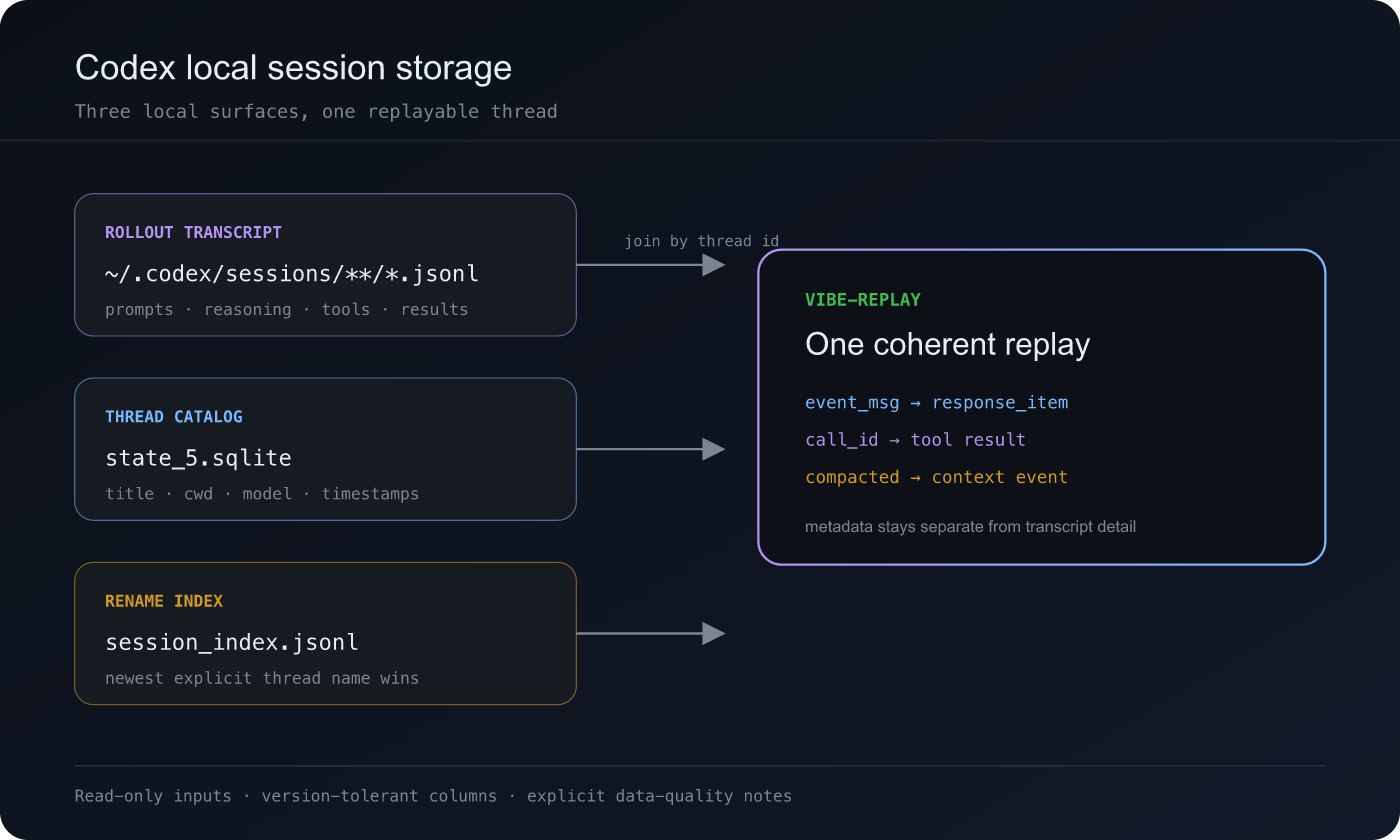
That is the layer vibe-replay has to reconcile before it can show a faithful replay.
Where does Codex store sessions?
Codex uses ~/.codex by default. CODEX_HOME can point the session home somewhere else, and CODEX_SQLITE_HOME can place the SQLite catalog in a different directory.
The important files are:
~/.codex/
├── sessions/
│   └── .../*.jsonl
├── session_index.jsonl
└── state_5.sqlite
The exact rollout subdirectories and database columns can change between Codex releases. Treat these paths as the current local layout, not a permanent public API.
If you want to inspect a synthetic example without reading the transcript, the catalog query looks like this:
sqlite3 "${CODEX_SQLITE_HOME:-$HOME/.codex}/state_5.sqlite" \
  'select id, title, cwd, updated_at from threads order by updated_at desc limit 10;'
The database is useful for finding threads. It is not the source of every prompt, tool result, or reasoning block.
What is in state_5.sqlite?
The central table is threads. A row can contain fields such as:
- a stable thread id;
- the rollout path;
- created and updated timestamps;
- the working directory and Git branch;
- the title shown by resume UI;
- the first user message;
- model and CLI-version metadata;
- token totals maintained by Codex.
Some installations have older or newer column sets. A reader that selects every modern column unconditionally will eventually meet no such column on a perfectly valid local database. A defensive reader probes the table shape first and treats optional columns as optional.
That is also why state_5.sqlite should be opened read-only. It is a catalog and metadata source, not a database that a replay tool needs to modify.
Why is there a second session_index.jsonl?
Codex thread names are append-only events. A rename does not need to rewrite the whole thread row; it can append a record to session_index.jsonl.
A simplified record looks like this:
{
  "id": "thread-demo-001",
  "thread_name": "Review the session explorer"
}
The newest valid name for a thread wins. A trailing line can be incomplete while Codex is writing it, so a reader should keep the previous valid name instead of discarding the entire index.
In practice, the precedence is:
- the latest explicit name from
session_index.jsonl; - the catalog title from
state_5.sqlite; - a title or first prompt recovered from the rollout.
That ordering is small, but it makes a session list feel like the tool the user actually used rather than like a raw database dump.
What is inside a rollout JSONL file?
Codex rollouts are event streams. The same session can contain several event families:
session_meta       → id, cwd, source, memory mode
turn_context       → model, approval and sandbox policy
event_msg          → user text, assistant text, tool completions, token snapshots
response_item      → messages, reasoning, tool calls, patches, web search, MCP
compacted          → context compaction records and summaries
The practical parser problem is correlation. A command may start in one record and finish in another. A patch can be announced separately from its changed files. A tool completion can arrive without a matching start record. A user message can be represented by both event_msg and response_item.
The safe approach is to key pending work by call_id, join terminal records back to their starts, and deduplicate repeated message payloads by content plus a small timestamp window. If a completion has no start, keep it as an orphan tool call rather than silently losing evidence that the agent did work.
What can you learn from Codex telemetry?
Codex can persist more than visible text:
- token snapshots, including cached input and output totals;
- model context-window limits;
- task duration records;
- approval policy and sandbox mode;
- memory mode;
- context-compaction events;
- MCP server and tool names.
These fields are valuable, but they are not all the same kind of measurement. A token snapshot is not necessarily the model context size. A task duration is not necessarily wall-clock time. A missing snapshot is a coverage limitation, not proof that the session used zero tokens.
That distinction matters when you build analytics. Label estimates as estimates and keep provider-reported values separate from locally inferred values.
How vibe-replay reconstructs Codex sessions
vibe-replay merges the three local surfaces instead of choosing one and pretending it is complete:
- discover threads from
state_5.sqlitewhen the catalog is available; - apply the newest explicit title from
session_index.jsonl; - scan rollout JSONL for prompts, responses, reasoning, tools, patches, timing, and usage;
- use the stable thread id to deduplicate the same session discovered through multiple surfaces;
- preserve incomplete or metadata-only sessions with an explicit status rather than generating an empty replay.
The result is a self-contained replay that can show both the conversation and the context around it: model changes, task boundaries, compactions, tool calls, and data-quality notes.
You can compare this with the simpler one-file mental model in What Does Claude Code Store Locally?, or with Cursor’s multi-store design in What Does Cursor Store Locally?.
A privacy note before you inspect the files
Codex transcripts can contain prompts, file contents, command output, local paths, and links. The catalog can contain working directories and titles. Treat both as private application data.
Before sharing a raw rollout or database export:
- remove prompts and command output you did not intend to publish;
- replace local paths with synthetic paths;
- do not upload
state_5.sqlitejust to share a replay; - prefer a generated replay after reviewing its redactions.
The easiest safe workflow is to let vibe-replay read the local sources and export the reviewed result, rather than turning the entire Codex home directory into an attachment.
Codex is not hiding one giant transcript in one obvious place. It is maintaining a catalog, an index, and an event stream for different jobs. Once you understand that division, /resume behavior becomes less mysterious — and building reliable tooling becomes much easier.