What Does Hermes Store Locally? state.db + Profiles
Hermes keeps session metadata, token accounting, reasoning, and tool calls in SQLite — with named profiles, Bot Chat, and two different compaction signals.
Hermes sessions look like conversations, but Hermes stores them like a small observability system.
The database knows things a transcript alone usually does not: the session’s model, Git branch, token totals, estimated and actual cost, profile, end reason, and whether the session is pinned. The message table then adds the visible conversation, reasoning, tool calls, and tool results.
The surprising part is that compaction is represented twice, named profiles are separate databases, and some of the most active sessions have no workspace path at all. A parser that reads only the default file, treats every empty cwd as one “Hermes” bucket, or counts every user row will produce a replay that is technically readable but semantically wrong.
The practical mental model is:
~/.hermes/state.db
~/.hermes/profiles/<name>/state.db
        │
        ├── sessions       → catalog, usage, cost, Git metadata
        └── messages       → prompts, reasoning, tool calls, results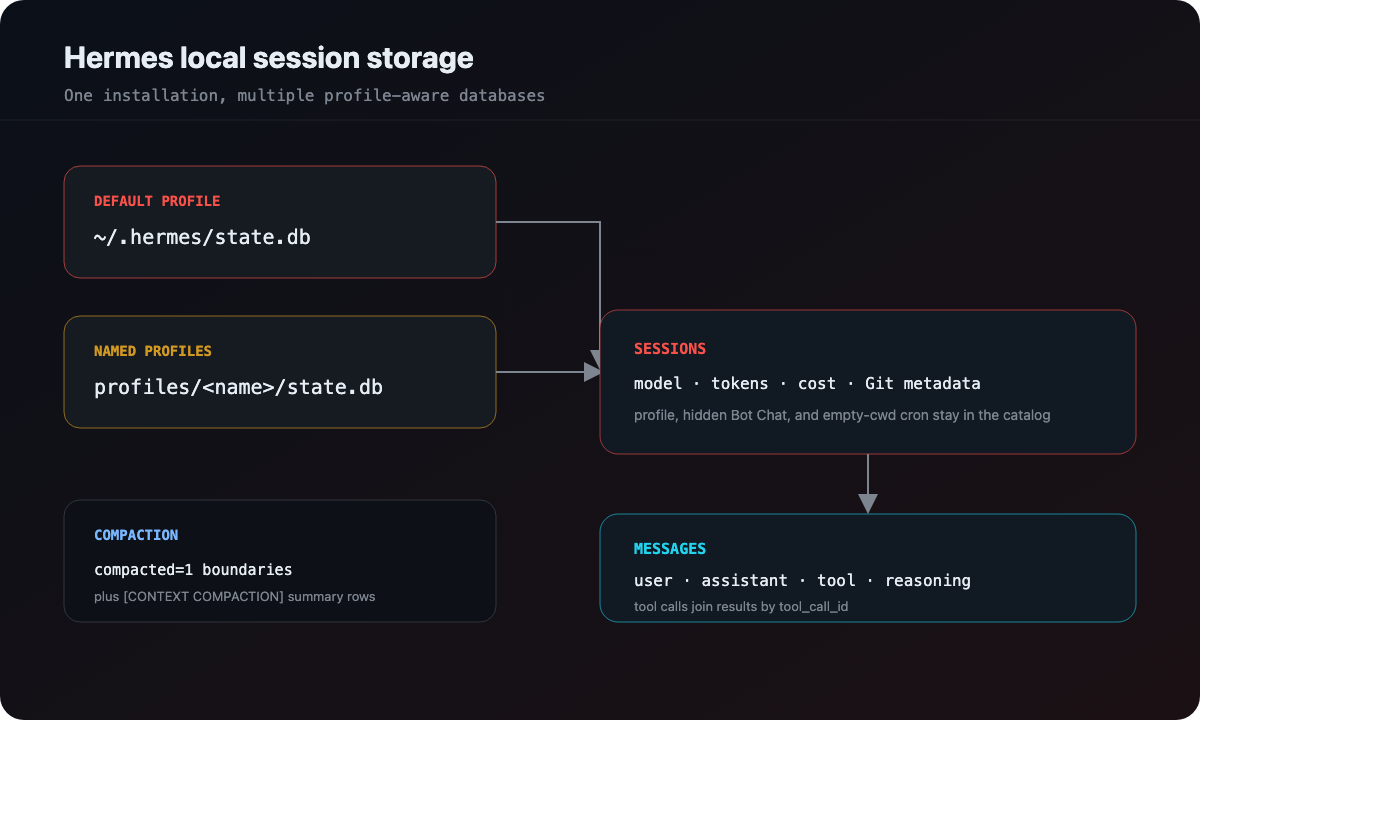
vibe-replay discovers those databases together, keeps profile identity out of the prompt text, and renders the result as the same replay format used for other providers.
Where does Hermes store sessions?
Hermes uses ~/.hermes by default. HERMES_HOME can override the root, with the same rule Hermes itself uses:
- no override →
~/.hermes; - a path inside
~/.hermes(profile mode, includingprofiles/<name>) → root stays~/.hermes, so sibling profiles remain visible; - a path outside
~/.hermesthat itself ends atprofiles/<name>→ root is that grandparent; - any other custom directory → that directory is the root.
The common layout is:
~/.hermes/
├── state.db
├── state.db-wal
├── .update_check
└── profiles/
    └── work/         # a named profile is a full home, not just a second file
        ├── state.db
        └── state.db-wal
A named profile can carry its own config, skills, cron jobs, and Bot Chat. Scanning only the default state.db makes that whole home look empty.
To inspect the layout without reading conversation data:
find "${HERMES_HOME:-$HOME/.hermes}" \
  -maxdepth 4 -name state.db -print
The .update_check file can contain the Hermes version. It is useful context when a schema looks different, but it is not part of the session transcript.
What is in state.db?
The sessions table is the catalog. Depending on Hermes version, a row can contain:
- session id, title, working directory, and model;
- start, end, and last-activity timestamps;
- message and tool-call totals;
- input, output, cache-read, cache-write, and reasoning tokens;
- estimated cost and actual cost, with a cost status (
estimated,included,unknown); - Git branch and repository root;
- parent session and profile name;
- pin, hidden, and end-reason flags.
cwd is optional. Cron runs, Bot Chat, and other gateway sessions often store an empty working directory. That is a real session class, not missing data.
The messages table carries the conversation. Hermes uses OpenAI-style roles, which makes the broad shape familiar:
user          → prompt text or a compaction summary
assistant     → text, reasoning, and tool_calls JSON
tool          → tool_name, tool_call_id, and result content
session_meta  → skipped by a replay reader
That shape is convenient for a replay reader, but the JSON payloads still need validation. A malformed tool_calls value should become a parse warning for one message, not a reason to discard the entire session.
Why named profiles matter
A profile is more than a UI preference. It has its own state.db, and two profiles can contain sessions with the same id shape. Scanning only ~/.hermes/state.db makes a named profile look empty.
The safe discovery sequence is:
- resolve the Hermes root;
- include the default
state.dbif it exists; - enumerate
profiles/*/state.db; - open only databases with the expected
sessionsandmessagestables; - deduplicate session ids while preserving the first resolved database path;
- sort the combined result by last activity.
When a session is later opened, the database path is part of the provider marker. That lets the parser find the right profile instead of guessing from the current HERMES_HOME.
Bot Chat is a hidden session, not a missing workspace
A named profile is more than an extra database. Hermes Bot Mode gives each bot its own home under profiles/<name>/, and the canonical Bot Chat is a session row with:
titleofBot Chat;hidden = 1;profile_nameset to that bot;- an empty
cwd.
Cron jobs look similar from the catalog’s point of view: empty cwd, a cron_* session id, and an end reason such as cron_complete. They are not Bot Chat, but they fail the same naive project rule — “no working directory means dump everything into one Hermes bucket.”
The useful mapping is:
cwd present     → project is the workspace
cwd empty       → project is profiles/<profile_name>
no profile path → fall back to a generic Hermes label
vibe-replay uses that fallback so two bots do not collapse into one project just because neither chat had a git repo. It does not invent a workspace that Hermes never recorded.
Hermes compaction appears in two forms
This is the detail most likely to make aggregate analytics lie.
1. Compacted transcript runs
Hermes can mark the pre-compaction history with compacted = 1. The rows remain in the database, so a full replay can preserve the history before the summary. A long session may contain several compacted runs.
The correct count is the number of run boundaries, not the number of rows with compacted = 1:
normal normal compacted compacted normal compacted compacted
                    ↑ one boundary             ↑ another boundary
2. Summary marker rows
Some stores also contain a user message beginning with a marker such as:
[CONTEXT COMPACTION — REFERENCE ONLY]That row is a compaction summary, not a human prompt. It should become a dedicated compaction event in the replay and should be excluded from prompt counts.
Older or summary-only stores may not have the compacted column. A robust reader falls back to the marker rows rather than declaring that the session never compacted.
This is a useful general rule: classify events by their provider semantics, not only by the role column they happen to use.
Where do Hermes costs and tokens come from?
Hermes maintains usage fields on the session row and a session_model_usage table for per-model splits. The useful cost rule is:
- prefer
actual_cost_usdwhen it is positive; - otherwise take
estimated_cost_usdwhen that is positive; - skip the number when
cost_statusisincludedorunknownand the stored totals are zero.
That last case is not “this session cost $0.00.” Subscription and unknown billing often store a literal zero. Reporting that zero as a reconstructed bill is worse than leaving cost blank.
Those values should not be recomputed from a local pricing table if Hermes already reported a total. A local estimate can be useful as a fallback, but it must not replace a provider-owned number or add itself on top of it.
The same caution applies to duration. started_at and last_activity_at define a broad window that includes idle time. Message timestamps help estimate active time. Tool duration is even narrower: Hermes stores the assistant tool_calls row and the matching role = 'tool' result as separate timestamps, so a reader can infer per-tool duration from that pair — as long as the gap is short enough to be execution rather than the user walking away.
The SQLite WAL caveat
Hermes may be running with a write-ahead log:
state.db
state.db-wal
state.db-shm
The state.db file can be structurally valid while the newest messages still live in WAL frames. A portable reader that loads only the database bytes may not see a long-running session until Hermes checkpoints.
That is not a reason to copy or mutate the live database. It is a reason to make the limitation visible: refresh after a checkpoint, keep the last stable cached version, or use the provider’s own export path when one exists.
How vibe-replay reads Hermes
vibe-replay keeps the fast dashboard pass lightweight and defers full parsing until a session is opened. Discovery reads the catalog fields and aggregate counters; the replay parser then:
- resolves the session id from a database marker;
- prefers the hinted profile database;
- falls back to probing known Hermes databases when needed;
- reconstructs user prompts, assistant text, reasoning, and parallel tool calls;
- joins tool results by
tool_call_idand infers tool duration from the two timestamps; - preserves orphan tool results instead of undercounting activity;
- maps cwd-less sessions onto the profile path instead of a generic bucket;
- emits compaction events and provider-reported usage separately.
The viewer can therefore show a full Hermes session without flattening away profile, cost, model, or compaction semantics.
A safe way to inspect Hermes history
Start with schema and catalog metadata. This inspects one database — the default home, or whatever HERMES_HOME points at. Use the find command above to list every state.db first, then repeat the query per file:
DB="${HERMES_HOME:-$HOME/.hermes}/state.db"
sqlite3 "$DB" 'pragma table_info(sessions);'
sqlite3 "$DB" \
  'select id, title, profile_name, hidden, model, last_activity_at
   from sessions order by last_activity_at desc limit 10;'
If hidden or profile_name is missing, drop those columns. Probe pragma table_info(sessions) first.
Do not publish the database itself. It can contain prompts, reasoning, tool arguments, file contents, tokens, and paths. Use synthetic examples when writing bug reports, and review the generated replay before sharing it.
Hermes is a good example of why “read the transcript” is not a complete storage strategy. The durable truth is a profile-aware SQLite catalog plus an OpenAI-shaped message stream, with Bot Chat, compaction, and billing metadata that deserve their own logic. Once you model those layers separately, the replay becomes both more accurate and more honest about what the source actually recorded.
For comparison, see OpenCode’s relational session database and the JSONL tree used by Pi coding agent.