What Does Pi Coding Agent Store? Session JSONL Explained
Pi stores a session as a JSONL tree, not a flat transcript: entries point to parents, branches can be abandoned, and compaction is its own event.
Pi’s session files look approachable: they are JSONL, one record per line, inside a directory under your home folder.
Then you try to replay one and discover the important detail: the file is a tree.
Pi can branch, compact, change models, add custom messages, and keep tool results in separate entries. The last line is not necessarily “the whole conversation.” It is a leaf in the active branch.
The useful mental model is:
session header
      │
      ├── message ── message ── message
      │                    └── alternate branch
      └── compaction / model change / custom context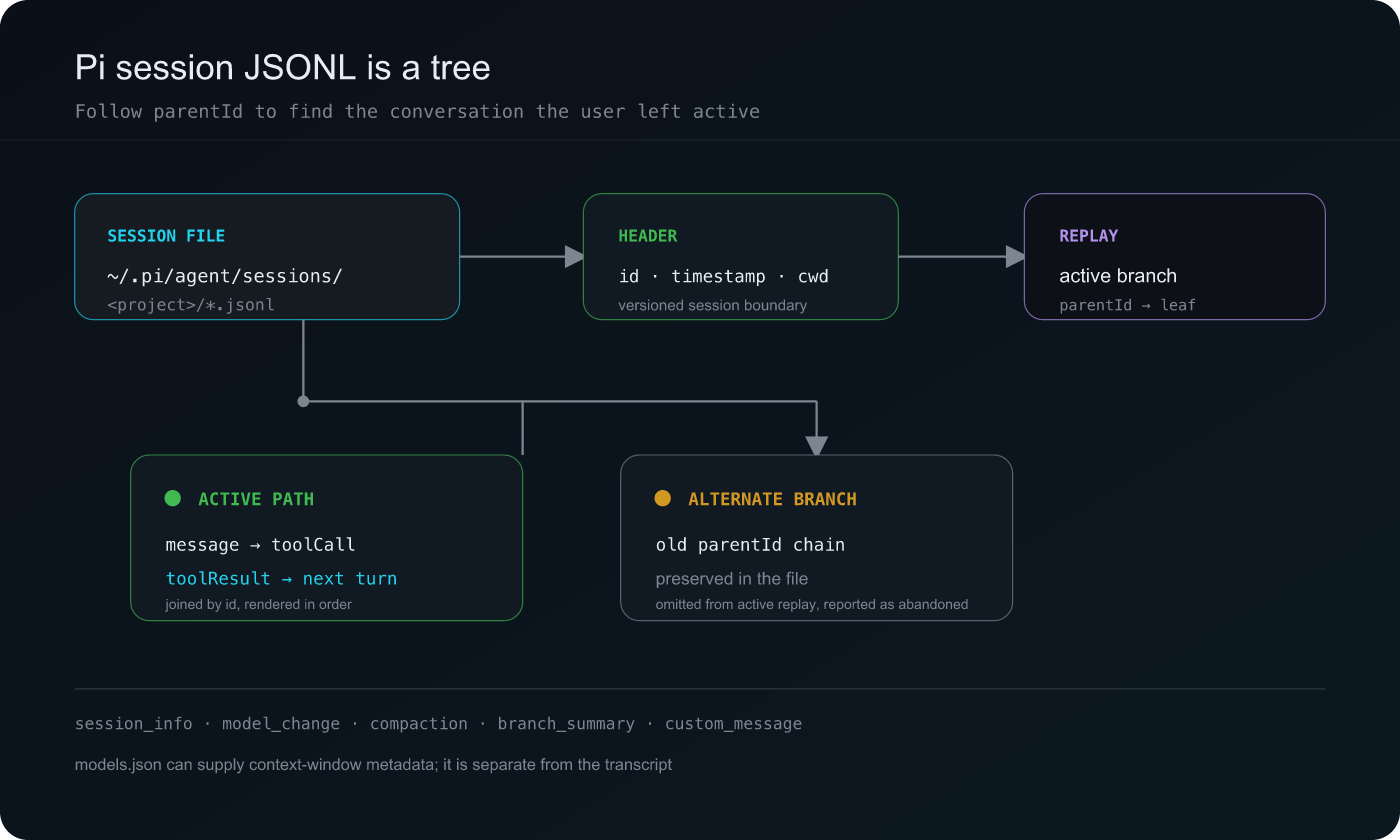
That tree is what makes Pi powerful for interactive work — and what makes a line-by-line parser subtly wrong.
Where does Pi store sessions?
Pi uses the agent directory under ~/.pi/agent by default:
~/.pi/agent/
├── sessions/
│   └── <encoded-project-directory>/
│       └── <timestamp>_<session-name>.jsonl
├── models.json
└── settings.json
PI_CODING_AGENT_DIR overrides the agent directory. PI_CODING_AGENT_SESSION_DIR overrides the sessions directory directly, which is useful for isolated environments and tests.
The project directory is encoded into the folder name. On systems where hyphens are valid path characters, decoding cannot always be done by simply replacing every hyphen with a slash. A reliable reader checks the real filesystem when it can and keeps unresolved suffixes intact instead of inventing a project path.
models.json is separate from the transcript. It can provide model context-window sizes that the JSONL session itself does not persist historically.
What does the session header tell you?
The first meaningful record should be a session header:
{
  "type": "session",
  "version": 3,
  "id": "pi-demo-session",
  "timestamp": "2026-06-05T10:00:00.000Z",
  "cwd": "~/workspace/demo-app"
}
The header gives the stable session id, format version, start time, and working directory. It is also the boundary between a replayable session and an arbitrary JSONL file that happens to live nearby.
If the first record is missing or malformed, the safest behavior is to mark the source as unreadable or metadata-only. Turning an arbitrary file into an empty replay hides the real data-quality problem.
Why parentId changes everything
Most Pi entries have an id and a parentId. That is enough to reconstruct the current path through the session tree.
Suppose a session contains this shape:
a (user prompt)
└── b (assistant response)
    ├── c (user follow-up)
    │   └── d (assistant response)
    └── e (alternate user follow-up)
        └── f (assistant response)
The file contains both c → d and e → f, but only one branch is active. A replay that renders every id in file order will show abandoned work as if it were the final conversation.
The branch-selection algorithm is simple in principle:
- choose the current leaf;
- follow
parentIdlinks back to the header; - reverse the collected entries into conversation order;
- keep id-less metadata entries when they are not attached to an abandoned branch;
- report how many off-branch entries were omitted.
That last count is useful. A branch is not data loss; it is part of the session history. The viewer can preserve the active replay while telling you that alternate entries existed.
What kinds of records does Pi write?
Pi’s JSONL is an event log, not only a message log. Common records include:
session_info   → human-readable session name
model_change   → provider and model selection
message        → user, assistant, toolResult, or bashExecution
compaction     → summary and pre-compaction context estimate
branch_summary → context carried across a branch operation
custom_message → extension or injected context
Assistant content can contain text, thinking blocks, images, and tool-call blocks. A toolResult message arrives separately and is joined to the assistant tool call by toolCallId.
That join matters for both correctness and privacy. The tool-call record tells you what was attempted; the result record tells you whether it completed, failed, produced images, or returned an exit code. A replay should not show “success” merely because a tool call was present.
Compaction is persisted, but its trigger may not be
Pi persists a completed compaction entry with a summary and sometimes tokensBefore. It does not necessarily persist the full lifecycle around that operation.
In particular, older Pi JSONL formats may not contain:
compaction_startandcompaction_endevents;- a durable
session_compact_failedevent; - every automatic retry or summarization retry.
That means a completed compaction can be exact while its trigger is unknown. A reader should not label every compaction “automatic” just because it happened near the context limit.
There are a few durable clues:
- explicit details can record a manual, threshold, overflow, or automatic reason;
- a preceding assistant message with
stopReason: "length"supports an inferred automatic-context classification; - a persisted failure message can be classified as a failed compaction diagnostic;
- an ordinary assistant API error should remain an assistant error, not be relabeled as compaction failure.
This distinction is more useful than a single compaction count. It tells a reader what Pi actually recorded and where the replay is making an inference.
Where do tokens and context limits come from?
Assistant message entries can carry usage fields such as:
{
  "usage": {
    "input": 4200,
    "output": 1100,
    "cacheRead": 6800,
    "cacheWrite": 700
  }
}
Pi also records usage on summarization entries. Those calls are separate model calls and must be included in session totals even though they do not create an ordinary assistant scene.
models.json can supply a configured context window for the active model. That is useful for charts, but it is not a historical guarantee that the same limit was used for every earlier turn. The honest labels are “recorded usage,” “configured limit,” and “inferred context drop,” not one blended number pretending to be exact.
How vibe-replay reads Pi sessions
vibe-replay follows the tree first, then parses the active branch:
- discover JSONL files under the configured sessions directory;
- validate the session header and collect lightweight metadata;
- select the active parent chain and count abandoned entries;
- join assistant tool calls with
toolResultrecords; - render user prompts, thinking, text, tools, images, branch summaries, and compactions;
- aggregate message usage and summarization usage separately;
- keep diagnostics about incomplete lifecycle events without copying raw error text into index metadata.
The output is a normal self-contained replay. You do not need to understand every branch pointer to browse the session, but the underlying tree still informs what the replay labels as active, abandoned, recorded, or inferred.
Inspecting a Pi session safely
Start by listing files and headers, not by dumping the entire directory:
SESSIONS="${PI_CODING_AGENT_SESSION_DIR:-$HOME/.pi/agent/sessions}"
find "$SESSIONS" -name '*.jsonl' -maxdepth 3 -print
head -n 1 "$SESSIONS"/*/*.jsonl
A session can contain prompts, tool arguments, command output, images, file paths, and extension-provided context. Do not paste raw JSONL into a public issue. Replace paths and prompts with synthetic values, and share only a reviewed replay.
Pi’s storage is a good reminder that JSONL does not automatically mean “linear.” The file is durable, inspectable, and easy to back up — but its parent links, branch state, separate tool results, and incomplete compaction lifecycle make the tree semantics part of the format. Once you respect that, replaying Pi becomes a matter of following the conversation the user actually left active, not merely printing every line in the file.
For database-backed comparisons, see OpenCode’s opencode.db and Hermes’s profile-aware state.db.