What Does Grok Bot Store Locally? agent-transcripts JSONL Explained
Grok Bot’s sidebar lists every agent, but each durable JSONL lives on the computer that agent is bound to — cloud-box agent-transcripts, not Mac Application Support — with send_message replies and merged group rooms.
Claude Code keeps sessions under ~/.claude/. Cursor spreads them across SQLite and JSONL. Grok Bot is different: the durable chat history is still cloud-box JSONL, not Mac Application Support — one file per agent, with a twist that user-visible replies are a tool call. The Grok Bot sidebar is account-level; that file lives on the computer the agent is bound to.
Try it: npx vibe-replay@latest -p grok-bot. Watch demo: Eng+GTM English group-chat replay (834 scenes, GCP/GA4 identifiers redacted). Public Grok Bot sessions also land on Explore.
Here’s where the files live, how the schema works, and what vibe-replay has to rewrite so a replay matches the chat you actually saw.
The practical mental model is:
/home/box/agent-data/agent-transcripts/<agentId>/<agentId>.jsonl
        │
        ├── optional sand-data symlink / ~/.grok-bot export
        └── sibling agents/<id>/profile.json  → titles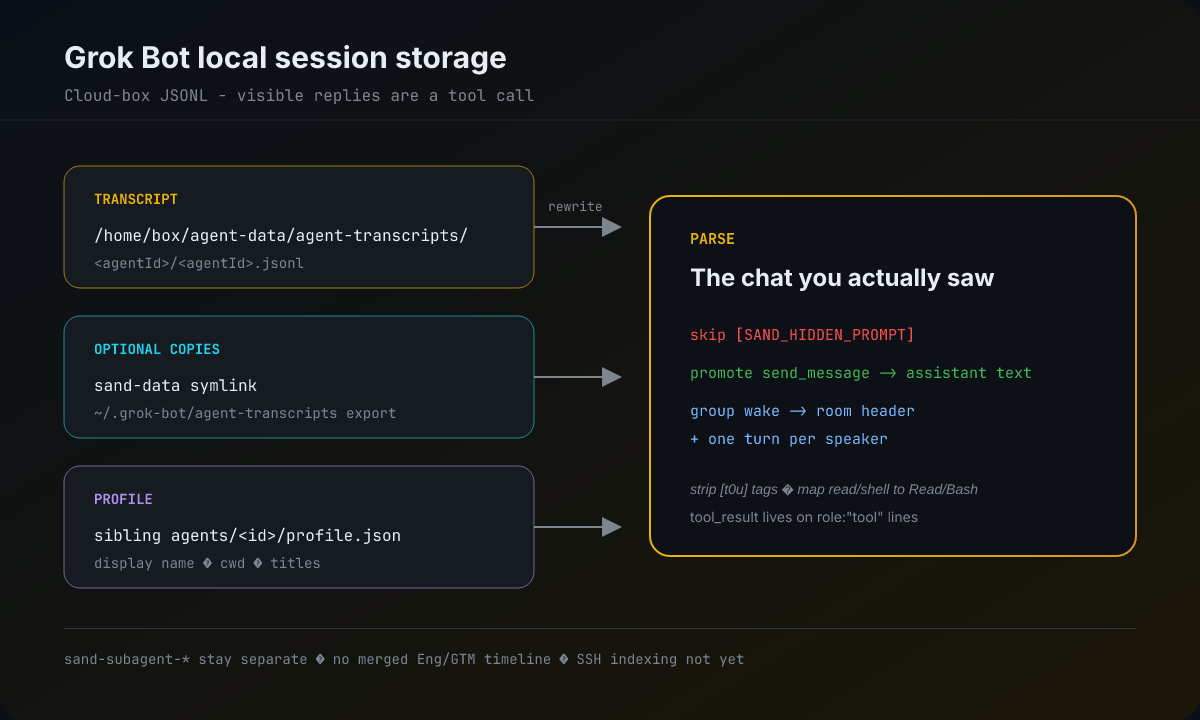
vibe-replay discovers those JSONL files, rewrites hidden wakes and send_message replies, and renders the result as the same replay format used for other providers.
Where the files live
On the computer the agent is bound to, transcripts default to:
/home/box/agent-data/agent-transcripts/<agentId>/<agentId>.jsonlagent-data often symlinks into sand-data, so you may also see:
/home/box/sand-data/agent-transcripts/<agentId>/<agentId>.jsonlLayout rules that matter for tooling:
| Path piece | Meaning |
|---|---|
<agentId>/ |
One folder per agent (or sand-subagent-<uuid>/ for background workers) |
<agentId>.jsonl |
Append-only conversation log |
sibling agents/<id>/profile.json |
Display name / cwd when present — used for titles |
There is no macOS Application Support path for these sessions. If you copy transcripts off the box, the documented drop spot is ~/.grok-bot/agent-transcripts with the same <id>/<id>.jsonl layout.
Point discovery at a copy with either env var (Pi-style override — replaces the defaults):
GROK_BOT_TRANSCRIPTS_DIR=/path/to/agent-transcripts npx vibe-replay@latest -p grok-bot
# or
VIBE_REPLAY_GROK_BOT_DIR=/path/to/agent-transcripts npx vibe-replay@latest -p grok-bot
SSH remote indexing of Grok Bot transcripts is not included yet.
One sidebar, many disks
Grok Bot’s sidebar is account-level: you see every agent. Each agent’s durable JSONL lives on the computer that agent is bound to — the user’s local machine, or a specific cloud computer. Different sidebar bots can therefore live on different disks. The on-disk layout is still the cloud-box tree above; vibe-replay does not assemble a cross-machine catalog from the sidebar.
That split is why a vibe-replay session list can look smaller than the Grok Bot sidebar:
npx vibe-replay -p grok-bot/ discovery only sees transcripts under this machine’sagent-transcriptsroots (/home/box/agent-data/...orsand-data, or a~/.grok-bot/...export sitting here). An env override replaces those defaults on the current machine; it does not pull other computers.vibe-replay relay(live E2E share) likewise only lists sessions on the machine runningrelay— not every bot in the sidebar. To share another bot, runrelayon the computer that holds that bot’s transcript. The command is on currentmain; it is not in the published npm package as ofvibe-replay@0.2.11. Build the CLI frommain, or wait for a release that includesrelay.- Subagents (
sand-subagent-*) stay hidden from top-level discovery (picker, dashboard, live list). A parenttaskcall can still attach a child-run card when the result names that sibling id. - Empty or first-run transcripts with no real user prompt are skipped, so a brand-new bot may exist in the sidebar and still not appear.
The JSONL shape
One JSON object per line:
{"role":"user"|"assistant"|"tool","message":{"content":[...]}}Content blocks look familiar if you’ve read Claude-style tool transcripts:
text— string payloadtool_use—{ name, input, toolCallId? }tool_result— lives onrole: "tool"lines, not nested under the next user turn
That last point is easy to miss. A Claude Code parser that only looks for tool results inside subsequent user messages will drop Grok Bot results on the floor.
Timestamps are sparse at the top level. When send_message (or other tools) return result.success.timestamp as epoch milliseconds, vibe-replay synthesizes ISO times from those; otherwise discovery falls back to file mtime. v1 does not surface thinking blobs.
Hidden prompts vs what you saw in chat
Two layers of text never appear the same way in the Grok Bot UI:
[SAND_HIDDEN_PROMPT]…— system wakes (first-run cues, routine fires, agent-to-agent resumes). Skip them for replay; they are instructions to the model, not chat.- Assistant
textblocks — private scratch. The model reasons here; the user does not see it as a bubble.
What you do see in the app is almost always a send_message tool call. vibe-replay’s Grok Bot provider promotes input.text.content into a normal assistant text scene and does not emit send_message as a tool-call beat. That single rewrite is why the replay feels like the product instead of like a tool dump.
User turns often arrive with delivery tags such as [t0u] / [t3u]. Those prefixes are stripped before display.
Tool names need a map
On disk, builtins show up as lowercase implementation names: read, shell, web_fetch, todo. The replay viewer expects canonical names (Read, Bash, WebFetch, TodoWrite) to build diffs and shell scenes. Unrecognized names (future builtins, MCP) pass through unchanged.
Subagents stay off the top-level list
Folders named sand-subagent-<uuid>/ stay hidden from picker, dashboard, and live/relay lists so they do not flood discovery. A parent task call attaches a child-run card when the result names that sibling id. Direct --session parse still works when the parent path is on disk.
Group chats: split speakers, then merge the room
A group turn still lands as ordinary role:"user" text starting with [Group chat: — and it’s still written into each participating agent’s own JSONL. As of PR #546, vibe-replay splits that blob into:
- A room header (
subtype: "context-injection") with title, participants, and@mentions - One turn per
Speaker: message, in order — humans stay on the user side, peer bots on the assistant side, each labeled withspeaker
Procedural noise is dropped: It's your turn…, The room is wrapping up…, No new messages in the room….
When any group payload is seen, the session title becomes Group: <room title>. Discovery can also pull the title from recent wakes or sibling agents/<id>/group.json.
PR #565 then merges sibling transcripts that share a room into one playable HTML timeline. Eng and GTM stay separate JSONLs on disk; the replay joins them by room so you see each bot’s own send_message, tools, and scratch instead of a single-agent view. Default visible replies are still send_message. Private assistant text is draft/thinking — the model sees it, the chat bubble does not.
Watch this room’s English Eng+GTM multi-speaker replay after #565 — Group: Tuo Lei, Vibe Replay GTM, Vibe Replay Eng (EN) · 834 scenes, an English translation of the real room with GCP/GA4 identifiers redacted (gist).
Try it
npx vibe-replay@latest -p grok-botOr open the full dashboard:
npx vibe-replay@latest -dWatch demo — Eng+GTM English multi-speaker replay. Public Grok Bot sessions also appear on Explore.
Grok Bot is a good reminder that JSONL does not automatically mean “linear Claude-style chat.” The durable truth is still one cloud-box file per agent — on the disk of the computer that agent is bound to — whose visible replies are a tool call. Hidden wakes are filtered out, group rooms are split by speaker, and sibling JSONLs that share a room merge into one multi-speaker timeline. Once you model those rewrites, the replay matches the product instead of the raw log.
For comparison, see the JSONL tree used by Pi coding agent and Hermes’s profile-aware state.db.